Section 1: What is a System?
Engineers and designers are in the business of solving problems. Whether designing a new bridge, a home electronic device, or a satellite communications system, engineers use a common way of thinking called the systems approach.
A system is a collection of components that work together to perform a function. All systems — no matter how simple or complex — can be described using the same basic structure:
This is called the universal system diagram. The word "universal" means it can be used for any situation at all.
- Input — what goes into the system to make it work (e.g. electricity, a signal, a physical force)
- Process — what the system does to the input
- Output — what comes out of the system (desired outputs and unwanted outputs)
A games console receives game data (from a disc or Wi-Fi connection), is switched on by the user, and receives input from a games controller. It outputs picture, sound and vibration, along with heat as an unwanted output.
Section 2: Sub-Systems Diagrams
The universal system diagram tells us what goes in and what comes out — but not how it works inside. The next step is to divide the process box into its sub-systems, showing how each part of the system interacts.
Key terms
- System boundary — a dashed line enclosing all the sub-systems. Real-world inputs and outputs are outside the boundary.
- Input device (sensor) — converts a real-world input into an electrical signal. Examples: thermistor, microphone, switch, light sensor.
- Output device (actuator) — converts an electrical signal into a real-world output. Examples: motor, loudspeaker, LED, heater.
- Output driver — an electronic component that boosts a low-power control signal from the control unit to provide the higher current or voltage required to operate an output device such as a motor or heating element. Every output device needs a driver (e.g. transistor, relay).
The games console has three real-world inputs: game data (from a disc or Wi-Fi connection), user input via the on/off switch, and user input via the games controller. The outputs are picture and sound (each accompanied by heat), plus vibration from the motor in the controller.
Section 3: Open-Loop and Closed-Loop Control
Any system must have some way to control its operation. Systems can also be described as open-loop or closed-loop.
Open-loop control
In an open-loop system, the output simply switches on or off when a certain input happens. There is no feedback — the system does not monitor its output. Once activated, it stays on until switched off.
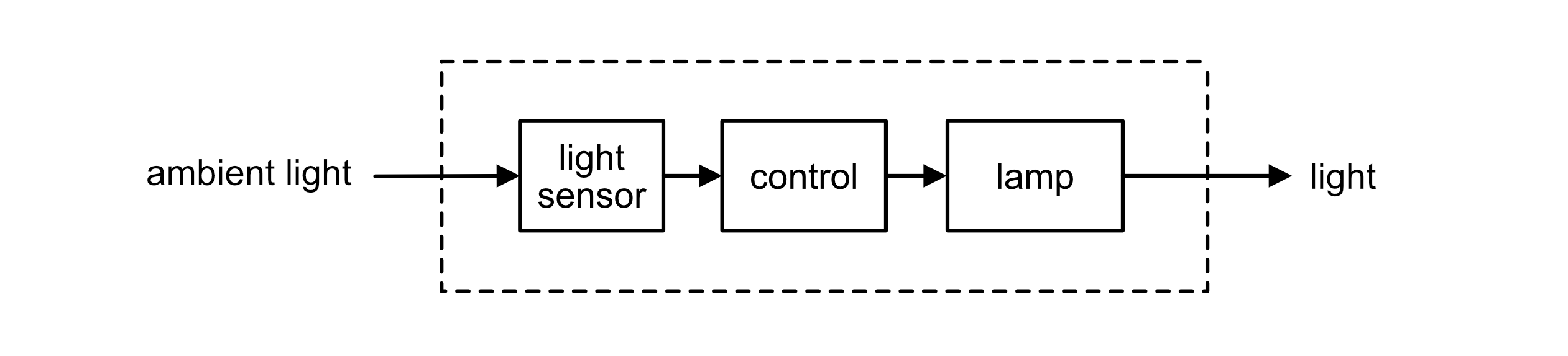
An automatic street light uses a light sensor to detect when it gets dark. When the light level drops below a set threshold, the light sensor triggers the control unit, which switches on the LED array via an output driver. There is no feedback — the system cannot detect whether the light is actually illuminating the street. It simply switches on when dark and off when light returns.
Why do we need feedback?
Imagine an oven with open-loop control: the heater is simply switched on for 20 minutes. On a cold day, with the door opened a few times or a heavy tray inside, the oven ends up cooler than intended. On another day it overshoots. The system has no way of knowing what temperature it has actually reached, so it cannot correct itself. To fix that, the system needs to measure its own output and act on the result — this is called feedback.
Closed-loop control
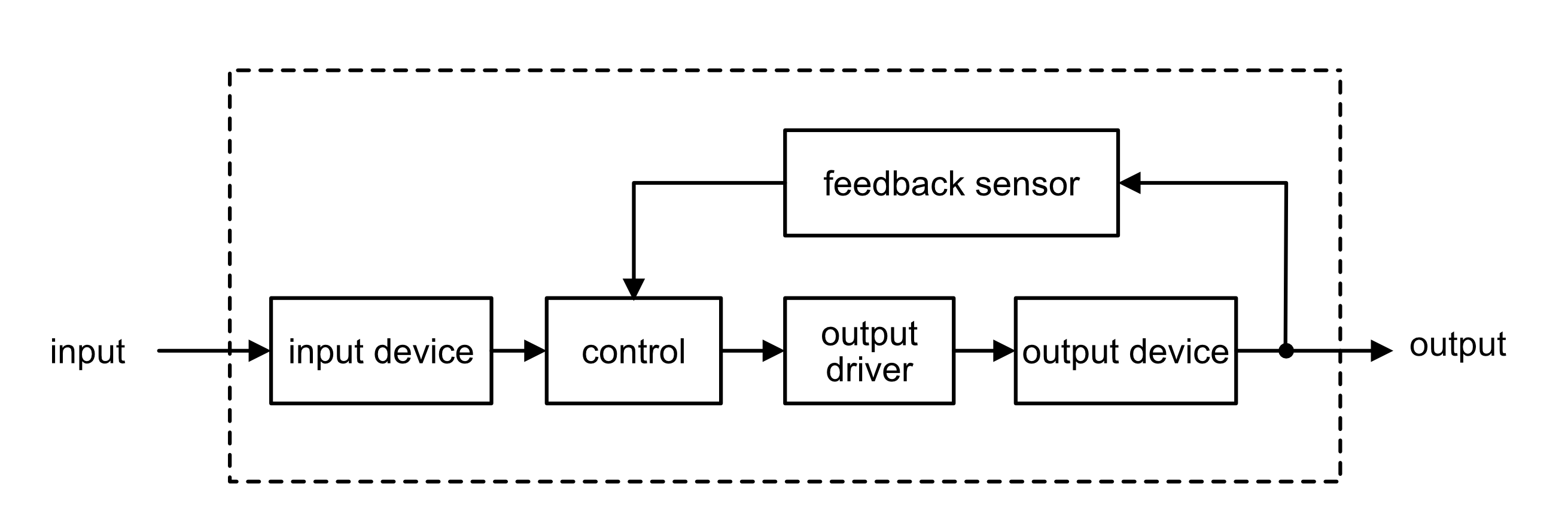
In a closed-loop system, the output is continually monitored and fed back to adjust the process. This makes the system far more accurate. The feedback signal is compared to the desired value and the system corrects itself automatically.
- Simple to design and cheap to build
- No feedback — cannot correct errors
- Output may drift from desired value
- Examples: toaster, street lamp timer, microwave oven
- More complex and expensive
- Feedback allows automatic correction
- Output is maintained at the desired value
- Examples: thermostat, cruise control, hair straighteners with automatic temperature control
Open-loop vs closed-loop: summary
| Type | Feedback? | Example |
|---|---|---|
| Open-loop | No | Street light activated by a light sensor — switches on when dark, no monitoring of output |
| Closed-loop | Yes — sensor monitors the output | Car cruise control, central heating thermostat, oven temperature control |
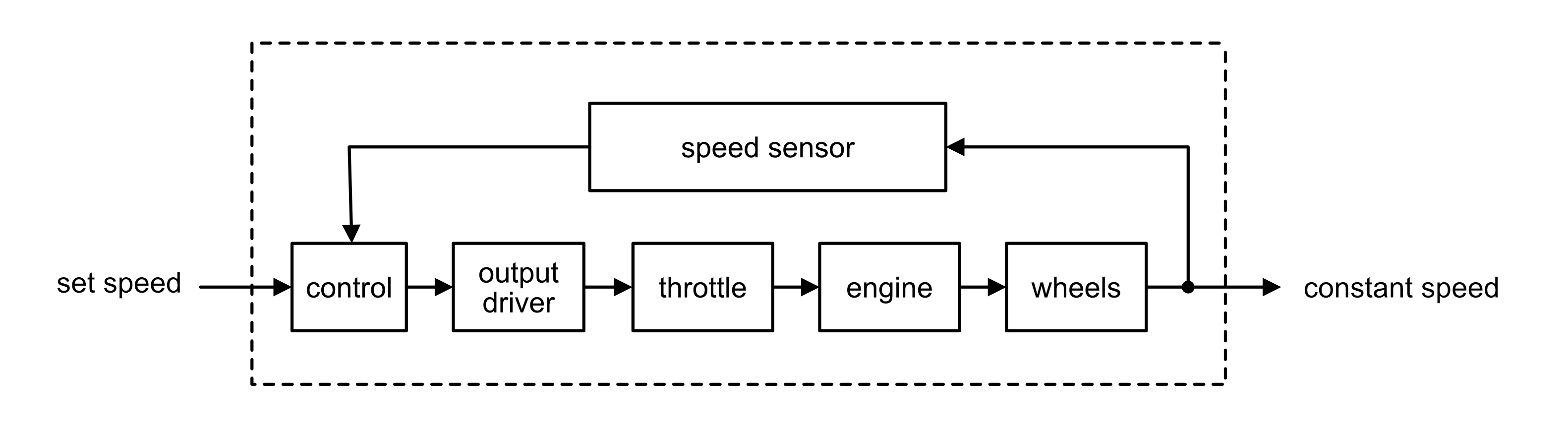
The driver sets a desired speed. A speed sensor (tachogenerator) continuously measures the actual vehicle speed and feeds this back to the control unit. If the actual speed differs from the set speed, the output driver adjusts the throttle to correct it. The system constantly monitors and corrects, keeping the speed accurate.
Section 4: Case Study — Domestic Appliances
Many everyday appliances use systems principles. The washing machine is a good example of a system with multiple levels of control complexity.
Washing machine
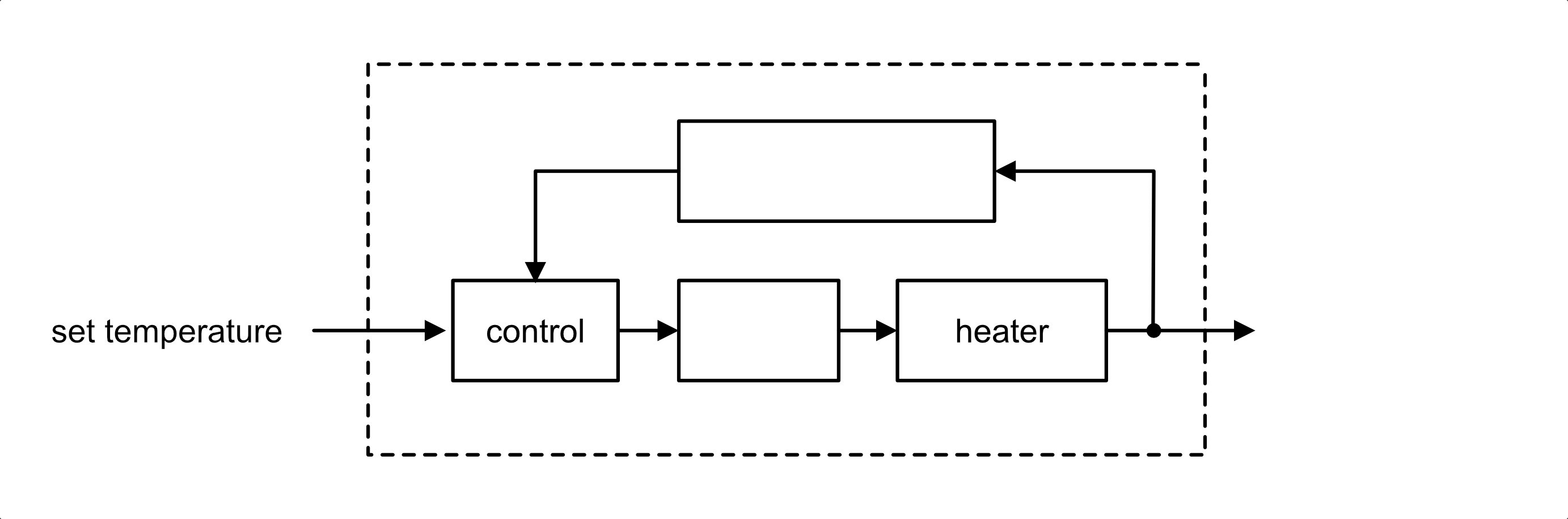
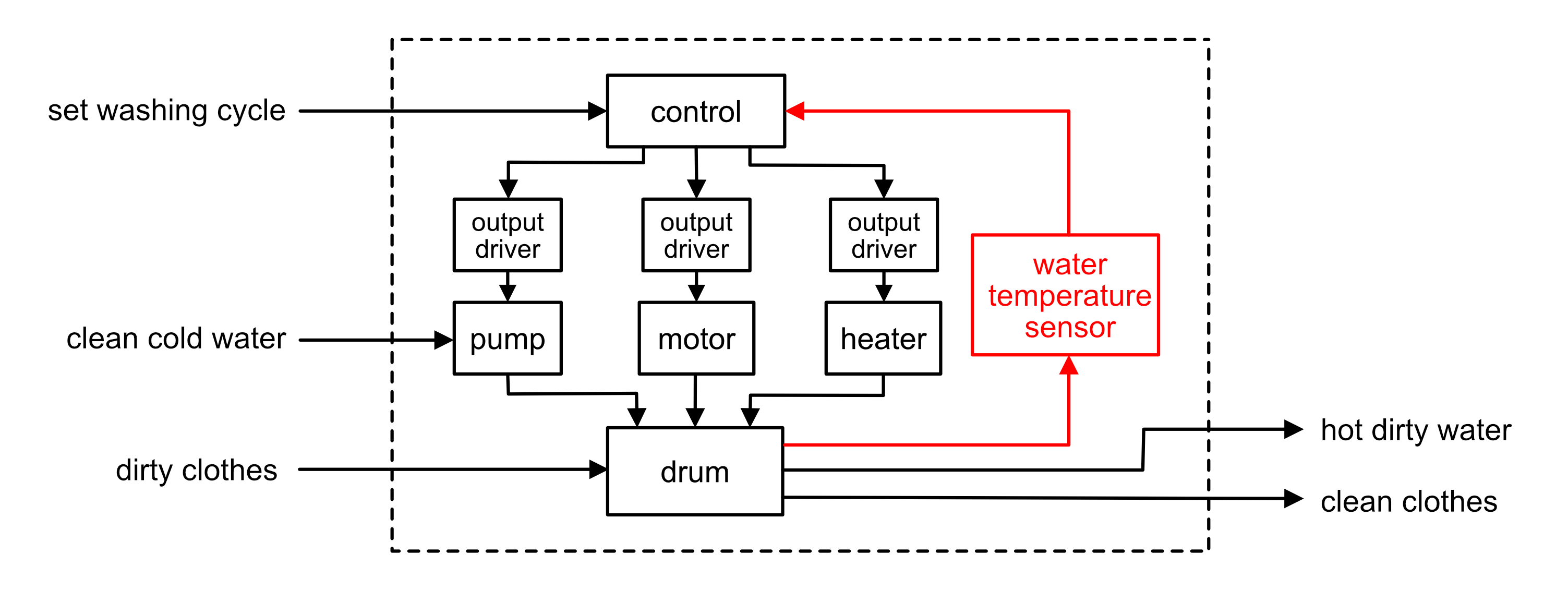
A washing machine is a complex system with both open and closed-loop elements. The wash programme (timer, spin speed) is essentially open-loop — it runs a fixed sequence regardless of outcome. However, the water heating uses closed-loop control — a temperature sensor monitors the water temperature and feeds back to the control unit, which switches the heater on or off to maintain the correct washing temperature.
The user sets a washing programme and temperature. The control unit switches the heater on via the output driver. A water temperature sensor continuously monitors the water and feeds back to the control unit. When the target temperature is reached, the control unit switches the heater off. If the temperature drops, the heater switches back on. This feedback loop maintains the correct temperature throughout the wash.
Section 5: Case Study — The Furby Electronic Toy
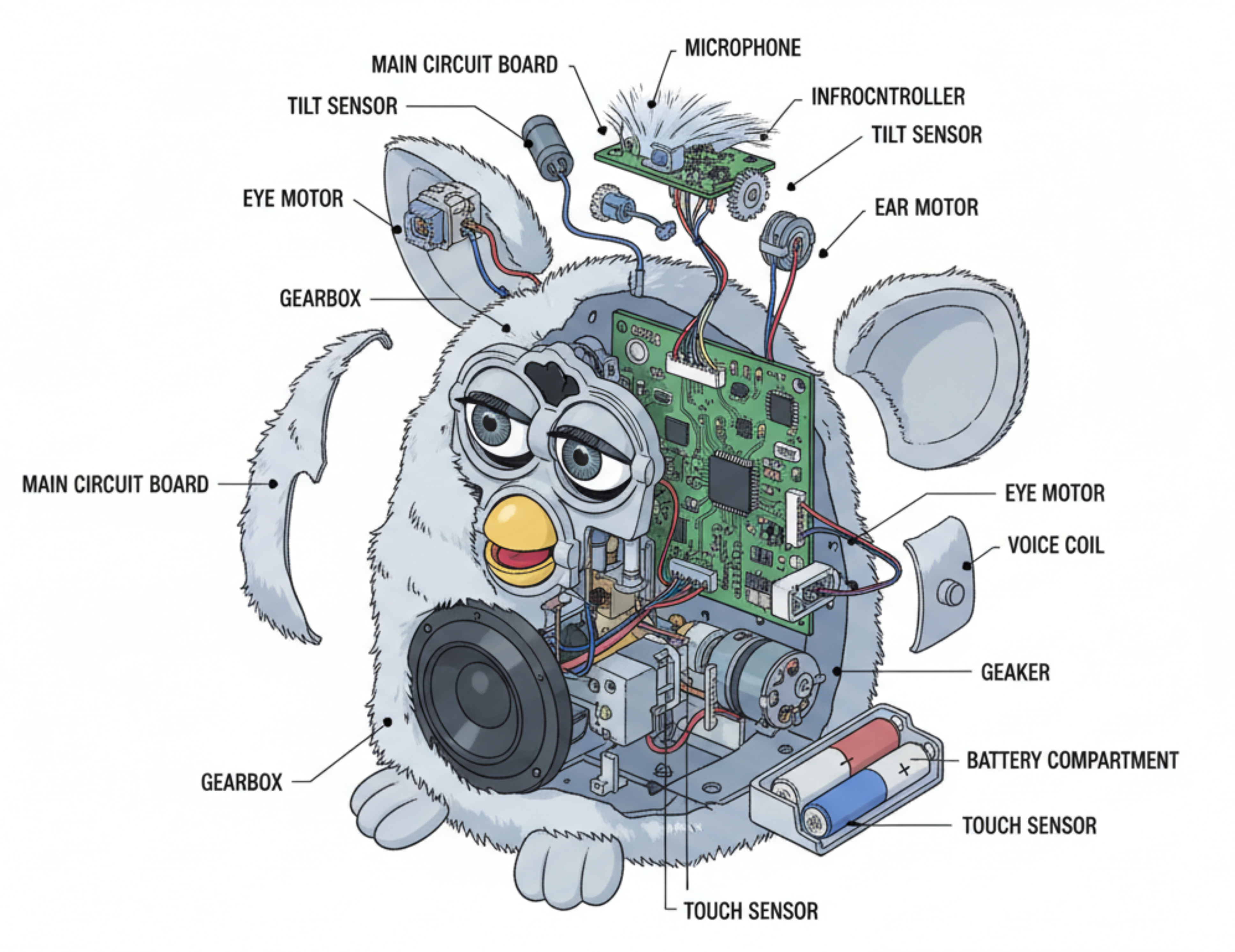
The Furby is a good example of a mechatronic system — one that uses an electronic circuit to control a number of mechanisms. It contains several sensors so it can react to changes in its environment (e.g. being placed in a dark room or turned upside down).
Section 6: Design Challenges
Engineers use the systems approach to design new systems, not just to describe existing ones. Each challenge below gives you a short brief and a numbered specification. Work through parts (a) to (d) in order: start with the big picture, then break it down into sub-systems, then decide how it should be controlled, and finally evaluate your design.
Design Challenge 1: Automatic bike light
A cycling charity wants a rear bike light that riders never forget to switch on. The light should come on by itself when it gets dark, but riders must still be able to switch it off completely when the bike is parked.
Specification — the system must:
| i | switch on automatically when the surrounding light level falls below a set level; |
| ii | switch off automatically when it becomes light again; |
| iii | have a master on/off switch that the rider can use to disable the system; |
| iv | flash a red LED so the cyclist is visible to drivers behind. |
Design Challenge 2: Aquarium heater
Tropical fish need their tank water kept at a steady temperature. A pet shop wants a heater unit that holds the water at whatever temperature the owner sets, and warns them if something goes wrong.
Specification — the system must:
| i | allow the owner to set the desired water temperature using a dial; |
| ii | keep the water at the set temperature automatically, switching the heater on and off as needed; |
| iii | light a warning LED if the water becomes too hot; |
| iv | be fully enclosed so that no electrical parts touch the water. |
Design Challenge 3: Hands-free bin lid
A school canteen wants to reduce the spread of germs by fitting a bin whose lid opens without being touched.
Specification — the system must:
| i | open the lid when a hand is detected above the bin; |
| ii | close the lid automatically a few seconds after the hand is removed; |
| iii | sound a buzzer when the bin is full; |
| iv | have a main on/off switch for the canteen staff. |